Your product's next user interface is an AI agent
Your customers already keep an AI assistant open all day, and they increasingly ask it to do things: pull up an account, update a record, say what changed since yesterday. It can only comply if it can reach your product. After two decades of building APIs for developers, the next consumer of your platform is an agent acting on behalf of a signed-in user, in real time.
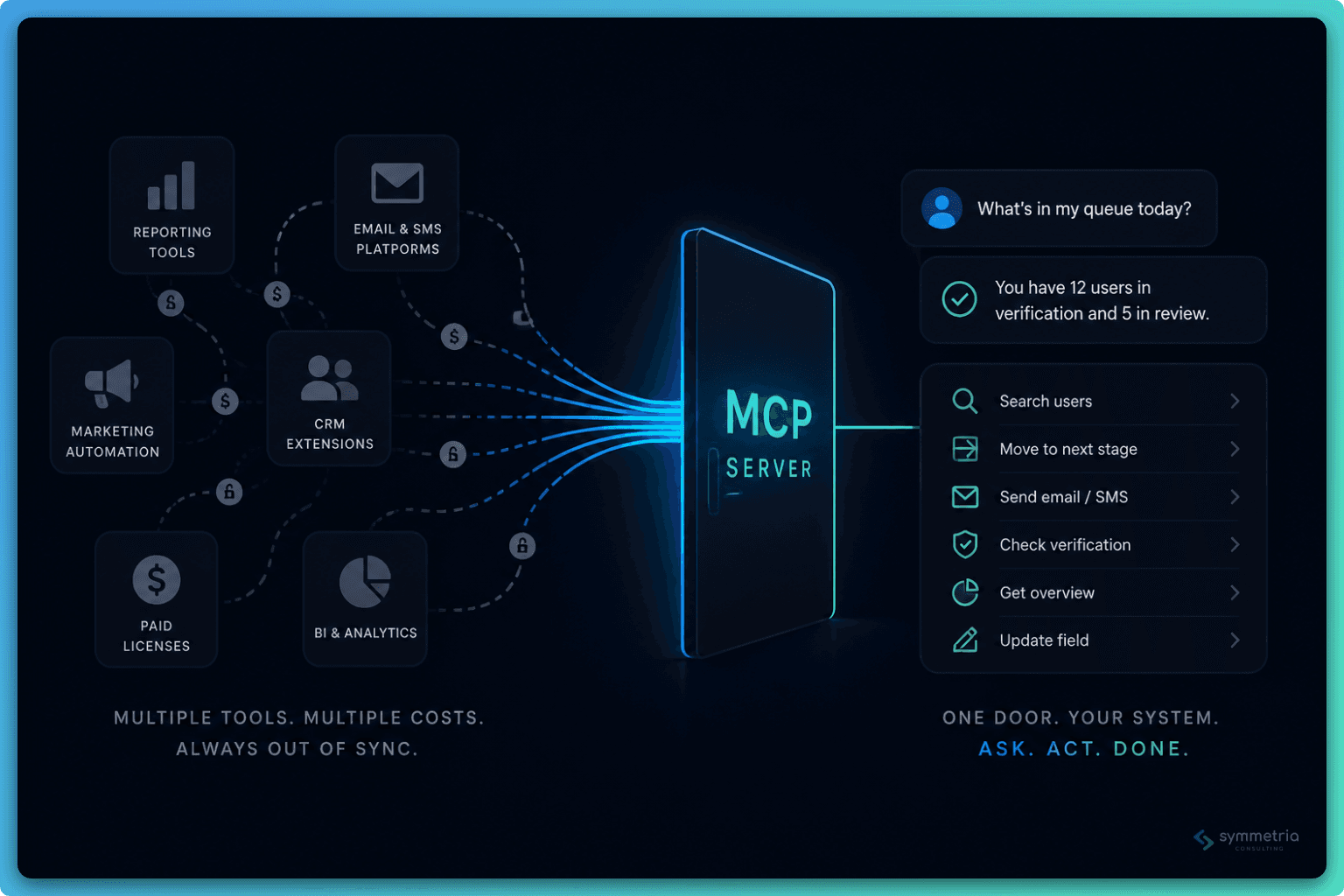
The Model Context Protocol (MCP) is the open standard that makes that possible. An MCP server exposes a set of tools: named operations with typed inputs and plain-language descriptions an AI client can discover, understand, and call. Any compatible client, Claude or Copilot or ChatGPT or an AI-enabled IDE, can connect to any MCP server. It plays the role for agents that REST played for web integrations: one standard surface instead of a bespoke integration per client. Build it once, and every assistant your customers use can work with your platform.
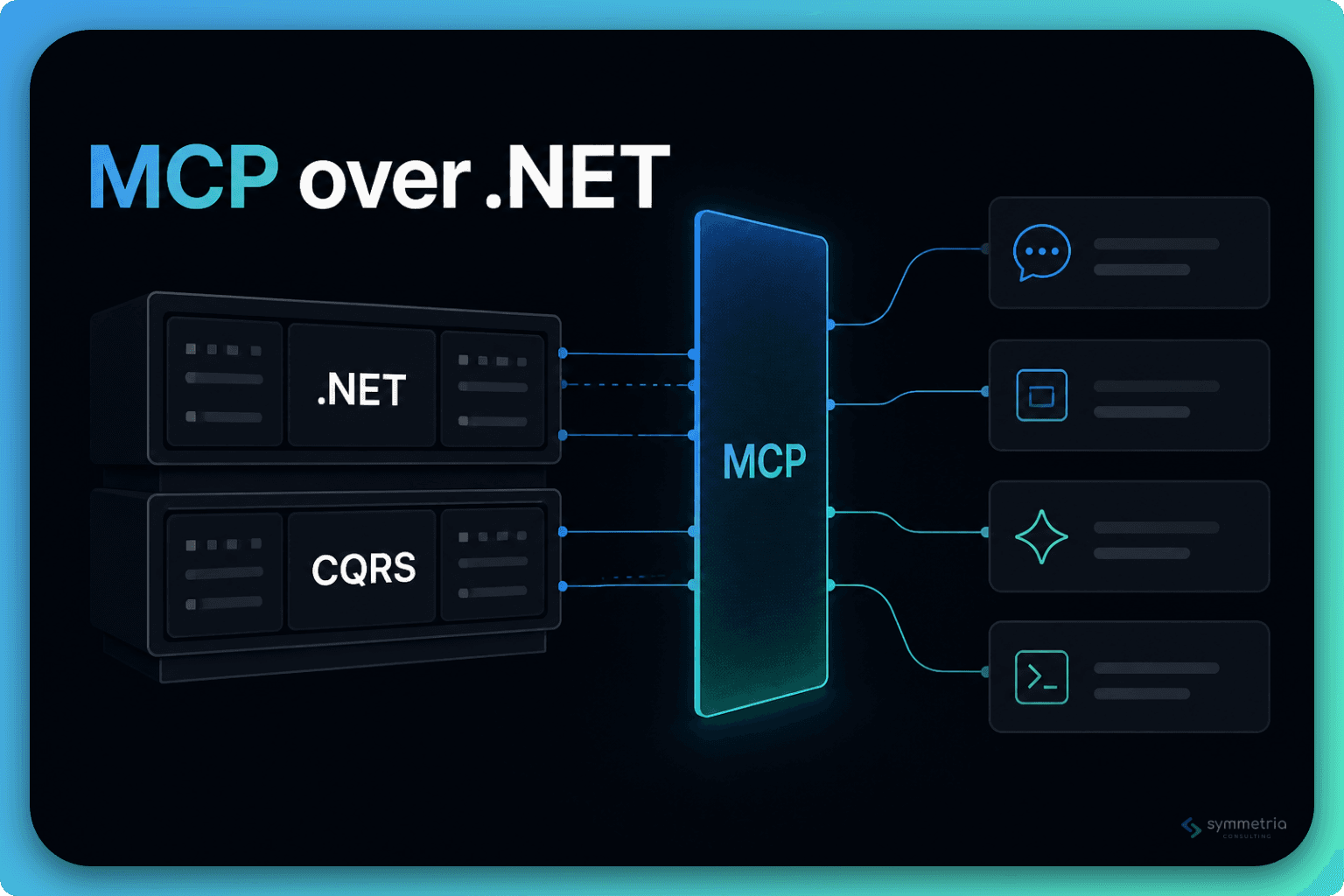
For .NET teams, none of this requires an exotic stack. The official C# SDK plugs into ASP.NET Core the way you'd expect: dependency injection, middleware, endpoint routing. Your existing team builds this with the skills they already have. What a hello-world tutorial won't tell you is what it takes to run this in production: how untrusted AI clients authenticate, how you guarantee an agent never does more than the user driving it, how you keep responses from quietly burning your customers' AI budget. Those patterns are what this post covers, drawn from building and operating a production MCP server on a large multi-service .NET platform.
Don't build a second product
The biggest risk here isn't technical. It's ending up with two products: the one your users click through, and a parallel AI-facing API with its own validation, its own rules, and its own bugs that only surface when an agent finds them. Every rule you implement twice will eventually disagree with itself, and the second implementation never gets the same care as the first. If your MCP server is a separate codebase reimplementing what your application already does, you've signed up to maintain it forever.
The pattern that avoids it is simple: the MCP server is a thin facade over the application logic you already have. A tool translates the model's input into a request, dispatches it to logic that already exists, and shapes the response. Nothing else. Whether that dispatch is an in-process handler call or a call to an internal API another service exposes, the substance (validation, authorization, business rules, persistence) stays where it always lived. A bug fixed there is fixed for the UI and the agent at once. A complete tool can be this small:
[McpServerToolType]
public class CustomerTools(IMediator mediator)
{
    [McpServerTool(Name = "search_customers")]
    [Description("Searches customers by name, email, or external reference. Returns at most 20 matches.")]
    public async Task<SearchCustomersResult> SearchCustomers(
        SearchCustomersRequest request, CancellationToken ct)
    {
        var result = await mediator.Send(new SearchCustomersQuery(request.Term, request.Page), ct);
        return SearchCustomersResult.From(result);
    }
}
The query, its validator, and its handler all existed before the MCP server did. The only new code is the translation at the edges. The wiring is just as small. Registering the server, discovering every attributed tool, and exposing the endpoint takes a handful of lines:
builder.Services
    .AddMcpServer()
    .WithHttpTransport()
    .WithToolsFromAssembly();

var app = builder.Build();
app.MapMcp("/mcp");
That's the entire footprint. The tools-from-assembly call picks up every class marked as an MCP tool type and registers its tools; mapping the MCP endpoint makes the server one route among the ones you already have. No separate host, no new framework to learn.
It even has a middleware story. The SDK exposes two tiers of filters. Message filters wrap every message flowing in either direction. Request filters wrap a single operation the way an action filter wraps a controller action, one per protocol operation — one for tool calls, one for tool listing, and likewise for prompts, resources, and completions. A request's path through the pipeline, simplified:
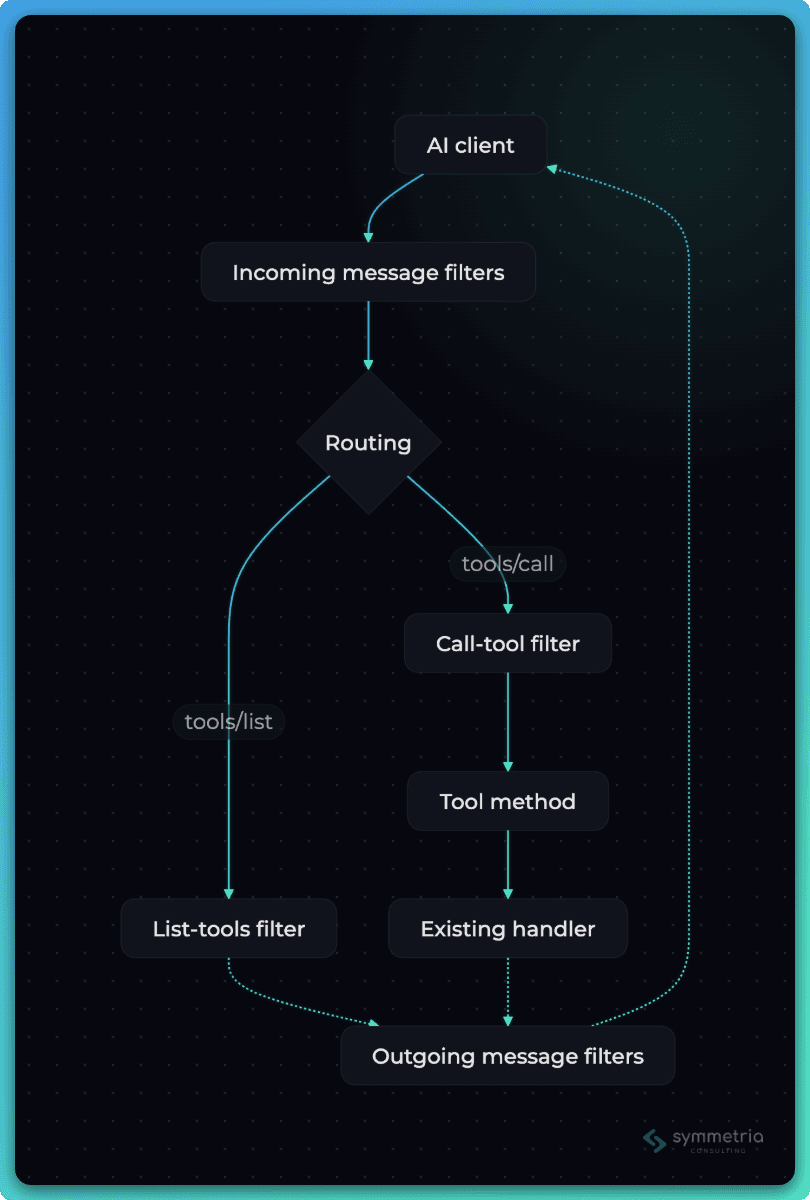
Filters are where cross-cutting concerns live exactly once instead of scattering across dozens of tools: request logging, rate limiting for a runaway agent, response-size metrics (a later section explains why you'll want those), error shaping. That last one deserves a sentence: let validation messages pass through unchanged, since they tell the agent how to fix its input, and replace everything else with a safe generic error, because a model will happily repeat a stack trace to your customer.
Where the server lives depends on how far it needs to reach. If one service owns the domain your tools operate on, host the endpoint inside it: zero new deployables, and it rides that service's middleware pipeline. If your tools cut across several services, give the MCP server its own service that delegates every tool to the internal APIs your services already expose to each other. With dozens of services, the dedicated option usually wins; the alternative is sprinkling MCP endpoints and client-facing auth concerns across the fleet.
Either way, one line must not move: the MCP layer never grows business logic. The moment a tool starts re-validating rules the owning service already enforces, caching data it doesn't own, or stitching three internal calls together to compensate for an API that doesn't exist, you're building the second product again, just gradually. When a tool needs logic that's missing, add it to the owning service and call it.
Contracts are one place the second product sneaks back in. Tool inputs and responses deserve their own purpose-built types (more on why in a later section), and purpose-built types drift away from the internal models they mirror. Keep them anchored: derive them from your internal DTOs where you can, and where you can't, make drift loud. When a field changes meaning, you want a compile error, not an agent confidently reading stale data.
Letting strange clients in, safely
Authentication is where MCP departs from what you know. The clients connecting to your server aren't your SPA or a partner integration you onboarded with a signed contract. They're apps your customers chose: a desktop assistant, an AI-enabled IDE, an agent runtime you've never heard of. You don't control them, you didn't register them, and they'll be reading and writing customer data. This is the one part of the project where 'mostly working' should never reach production.
The MCP specification settles the approach: OAuth. Your MCP server is a resource server that validates bearer tokens, and the user signs in through your identity provider in a normal browser flow, so the AI client never sees a password. For an ASP.NET Core team this half is familiar territory: JWT bearer validation, plus strict audience checks so tokens minted for other APIs get rejected. The new piece is protected resource metadata, a small document your server publishes so clients can discover which identity provider to send users to. If you're multi-tenant, decide early how a token maps to a tenant and validate that mapping on every call.
The unfamiliar half is client registration. Every OAuth client you've ever run was registered by hand: someone created it in the identity provider, configured its redirect URIs, and stored its ID. An assistant your customer installed yesterday has no such standing arrangement, so the MCP specification defines how a stranger becomes a registered client. The spec offers more than one path, but the one to plan for is Dynamic Client Registration: the first time a customer connects their assistant to your server, the client calls a registration endpoint on your identity provider and receives its client ID on the spot. A newer alternative, Client ID Metadata Documents, lets a client identify itself with an HTTPS URL hosting its own metadata; clients use it when your identity provider supports it and fall back to Dynamic Client Registration when it doesn't. The fallback is what you have to secure, because it's the path any client can take. Most identity providers ship with self-registration disabled or tightly restricted, for good reason: anonymous registration with no rules is an open door.
The whole journey, from first connection to first tool call, simplified:
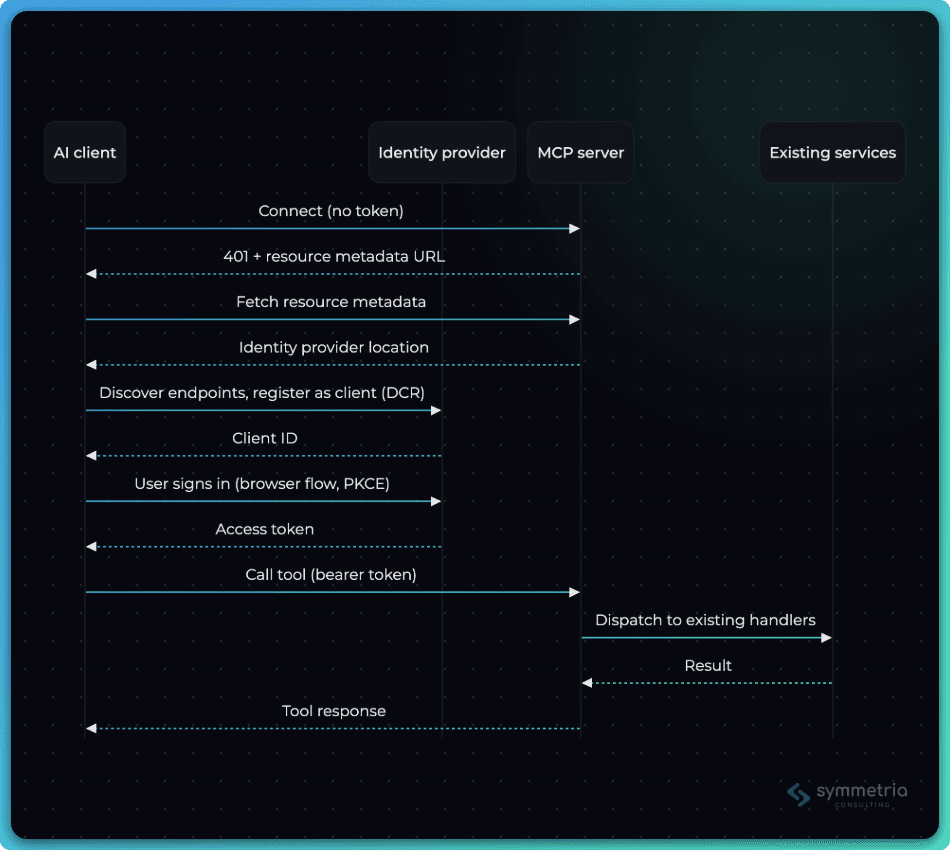
Before enabling self-registration, put guardrails around it: allowlist the scopes a self-registered client may request, constrain redirect URIs so tokens can't land on arbitrary hosts, and give self-registered clients a deliberately minimal default profile — browser flow only, no service-account access, nothing beyond what an interactive agent needs. Whatever identity provider you run, these controls exist as registration policies.
Every client exercises the flow a little differently. One re-registers on every connection, another caches tokens longer than you expect, a third is picky about metadata endpoints. The specification tells you what to build; the clients your customers run tell you whether it works.
The agent can never do more than the person driving it
When an MCP server reaches a security review, the first question will be what this thing can do. The only good answer: whatever the signed-in user can do, and nothing more. Two temptations pull teams away from it. A service account, giving the agent its own identity with broad access, is a super-user with a natural-language interface. A parallel 'AI permission' model is a second authorization system that will slowly drift out of agreement with the first, for the same reasons a second API would. The agent borrows the user's identity, and that's the whole design.
Being able to sign in shouldn't by itself mean AI access. Make it an explicit, revocable grant, expressed in whatever form your platform already models entitlements: a licensed feature, an admin toggle, a per-seat setting. In B2B the shape that works is two levels, where the customer decides whether AI agents may touch its data at all and then chooses which users get it. That buys real things. Customers adopt at their own pace, pilots start with a handful of users, and there's a kill switch the moment someone asks for one. Expect 'we control which of our people can use AI' to be a condition of the sale, not a nice-to-have.
Below that gate, every tool declares the permission it requires, and it's the same permission your UI already checks for the equivalent screen or button. A tool that updates a record carries a permission attribute right next to its tool attribute. That permission attribute is a small custom one you define yourself, not part of the SDK; it just tags each tool with the permission your existing authorization checks already use. Enforcement slots into the filter pipeline from earlier. One call-tool filter in front of every tool invocation checks both layers:
builder.Services.AddMcpServer()
    .WithRequestFilters(filters => filters
        .AddCallToolFilter(next => async (context, ct) =>
        {
            var user = await GetCurrentUser(context);

            // Layer 1: has this customer (and this user) opted in to AI at all?
            if (!user.CanUseAiAgents())
                throw new McpException("AI access is not enabled for this account.");

            // Layer 2: the same permission the UI checks for the equivalent action
            // RequiredPermissionFor reads the permission attribute
            var required = RequiredPermissionFor(context);
            if (required is not null && !user.HasPermission(required.Value))
                throw new McpException($"This action requires the {required} permission.");

            return await next(context, ct);
        }));
The list-tools filter completes the picture: trim tool discovery to what each user may actually call, so an agent never sees the buttons it can't press. The call-tool filter guards before the operation runs; this one shapes the result after it, the other half of the same middleware pattern:
.AddListToolsFilter(next => async (context, ct) =>
{
    var result = await next(context, ct);
    var user = await GetCurrentUser(context);

    // Same permission metadata the call-tool filter checks
    result.Tools = result.Tools
        .Where(tool => user.MayCall(tool))
        .ToList();

    return result;
})
Gate, permission check, and trimmed discovery together give the security review its answer: the agent's reach is exactly the user's reach, enforced in one place.
Tools a model can actually use
With the plumbing and the permissions in place, tool design is what decides whether anyone uses this. When an agent picks the wrong tool, guesses at an ID, or stalls on an error it can't interpret, your customer doesn't file a bug against the model. They conclude your product doesn't work with AI and stop asking. Tool design is a product surface now, and it follows different rules than a REST API.
Shape tools around jobs, not endpoints. The first instinct to resist is mirroring your API, one tool per endpoint, CRUD all the way down. Models don't think in resources; they think in jobs.
- Bad: one update_customer with thirty optional fields, where the model has to work out which four matter
- Good: update_customer_address, change_customer_status, correct_customer_email
Task-shaped tools make the right call obvious, and obvious is what you're optimizing for. Every extra inference the model has to make is a place it can go wrong.
Write descriptions as prompts, not documentation. The description is everything the model knows about a tool when deciding whether to call it, and nobody hands it your docs site. Say what the tool returns, what it needs, what it doesn't do, and what to call first:
- Bad: "Gets customer data."
- Good: "Returns a customer's profile and current status. Requires a customerId; call search_customers first to find it. Doesn't include order history, use list_customer_orders for that."
Write them the way you'd brief a new colleague, and keep them tight: tool definitions ride along in every conversation, so every word is a small recurring tax.
Let the agent discover instead of guess. Most agent failures trace back to invented identifiers and magic values: an ID that doesn't exist, a status string that's almost right. The rule that prevents them: every input should come either from the user or from an earlier tool result. That means search tools that take human terms (a name, an email) and return IDs, plus small catalog tools that list the valid options wherever an input is secretly an enum. They feel too trivial to build. Build them anyway. They're the difference between an agent that asks and an agent that hallucinates.
Keep the visible toolbox small. Measure the thing that matters: not how many tools you've built, but how many the model sees at once. Past a certain count, every additional tool makes the agent slightly worse at choosing all the others, and a hundred-tool wall buries the twenty a given job needs. That doesn't mean you need many small servers. One server can present many sharp views of itself: the list-tools filter from earlier already trims by permission, and the same mechanism scopes by product area or workflow, so a session only ever sees the tools relevant to it. Keep the built surface broad if your product is broad. Keep the visible surface small.
Every response costs your customer money
Every byte your server returns gets read, token by token, by a model your customer is paying for. That's a cost model most API teams have never had to carry. A REST endpoint that returns forty fields nobody looks at is wasteful but free. A tool response that returns forty fields the model doesn't need is billed on every call, slows the conversation down, and crowds out the context the agent needs for its actual work. Nothing warns you. An oversized response throws no exception, fails no test, and trips no alert. The agent just gets slower and more expensive, and nobody can say why.
The trap is convenience. The handler gives you a rich DTO, serialization is one line, done. That's how a tool ends up shipping a customer's entire record (audit fields, nested collections, internal flags) into a conversation that needed a name and a status. Give every tool a response type built for the next step in the conversation:
// Before: return what the handler returns.
// Forty properties, nested collections, audit fields. Billed on every call.
return await mediator.Send(new GetCustomerQuery(id), ct);

// After: return what the conversation needs.
public record CustomerSummary(int Id, string Name, string Status, string Email);

var customer = await mediator.Send(new GetCustomerQuery(id), ct);
return CustomerSummary.From(customer);
Lists work the same way. Paginate everything, cap page sizes, and say the cap out loud in the tool description ("returns at most 20 matches"), because the model plans better when it knows the limits. Let list tools return thin summaries with IDs, and let a detail tool carry the rest. The agent will ask for what it needs.
Then measure it, because this is the one quality dimension nothing else will catch. Response size is a first-class metric for an MCP server, the way latency is for an API. The outgoing message filter from earlier is the natural tap: record the size of every response by tool, alert on outliers, and review the top offenders now and then. The numbers will surprise you at least once.
Your customers won't see any of this work. They'll feel it, in snappier agents and lower AI bills.
The whole idea
An MCP server is a thin, well-guarded doorway into the product you already have, not a second product beside it. The tools borrow your existing logic, the agent borrows the user's identity, and the effort goes where users actually feel it: tools that are obvious to pick and responses that don't waste anyone's context. Most of it is a few filters and some discipline. Worth doing well, because agent access is heading where REST APIs already went: from something you brag about, to something buyers ask for, to something customers simply assume you have.